When patients are in need of a physician, clinic, or specialist in their area, they often prefer Google Maps as their first choice. Whether searching for a dentist, dermatologist, cardiologist, or general practitioner, they typically choose one of the top results shown in their local search area based on the local map pack. Therefore, combining your Google Business profile (GBP) with Google Ads can greatly enhance their visibility and enquiry volume.
By integrating your GBP with Google Ads, your clinic displayed both in a website search query through search results pages and in a local business listing in the map section. Implementing this strategy helps physicians significantly increase local patient engagement, driving more calls, website traffic, appointment bookings, and walk-ins from patients looking for care in their local area. For clinics that are focused on clinic lead generation, utilising Google ads for doctors with search campaigns can provide the clinic with a strong competitive advantage.
What are Google Maps Ads (Local Search Ads) for Clinics?
Google Maps ads for doctors are paid listings that appear above regular map results when users search for healthcare services nearby. The purpose of these ads is to increase the visibility of local healthcare providers and businesses.
When someone does a search like “ENT doctor near me” or “the best dentist near me“, Google shows sponsored listings for clinics at the top of Google Maps before they show regular organic listings.
Typically, the following is included in these listings:
- Name of the clinic
- Address of the clinic
- Button for directions to the clinic
- Button to call the clinic
- Patient reviews of this clinic
- Business hours for the clinic
Google Maps ads are shown at very visible positions; they can drive more phone calls and appointment bookings and generate more walk in customers than a standard search ad.
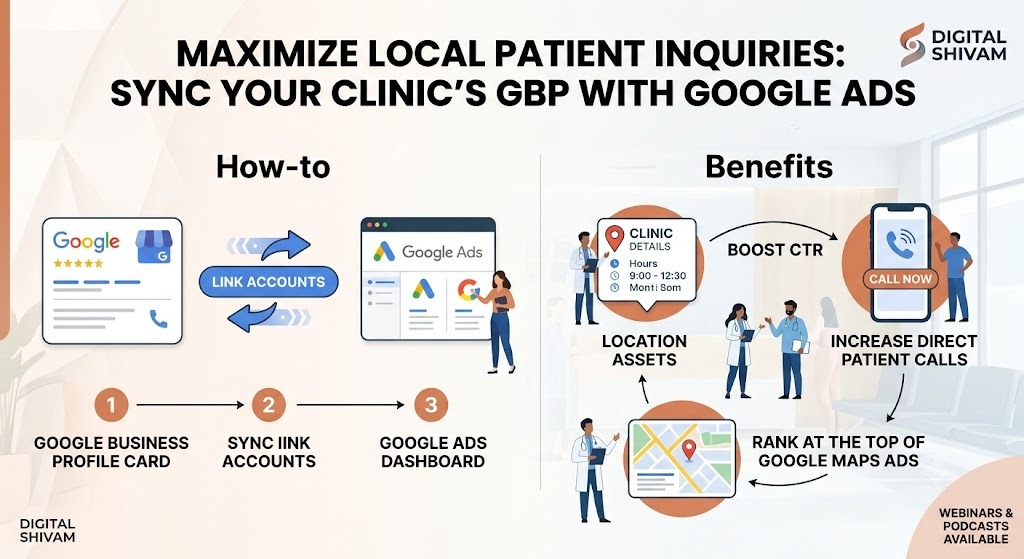
Step by Step Guide to Linking Your Google Business Profile to Google Ads
Step 1: Accessing ‘Assets’ (Formerly Extensions) in Google Ads
Log into your Google Ads account. Once you have logged in, go to Assets. Previously, these features were called “ad extensions” but are now referred to as “assets”.
These assets allow you to include your business information directly in your ads, such as your location details from your Google Business Profile.
Step 2: Selecting and Enabling Location Assets
Select the option for location assets, then start configuring these assets. Location assets allow Google Ads to showcase your clinic’s address, link to directions & other local information about your clinic when someone sees your ad.
Using location extensions provided by Google Ads helps your clinic show up locally, making it easier for your clients/patients to find you.
Step 3: Linking via Gmail Access Request
Google asks you if you want to connect your Google Business Profile account to your Google Ads account.
Simply,
- Select your Google Business Profile.
- Send access request
- Accept the request from the Gmail account that is connected.
Once you have accepted your request, your clinic’s information will be available to use in your Google Ads campaign.
How Location Extensions Boost Your CTR and Patient Calls
Using Location extensions Google Ads is one of the most effective ways to create more informative and trustworthy ad placements.
When location assets are active, your ads can display the following:
- Address of the clinic
- Distance from the patient
- Business hours
- Rating and review of the clinic
- Click to call button to contact the clinic.
- Directions link
For mobile devices, it gives users a smoother experience; instead of visiting multiple websites, users can call the clinic, get directions to the clinic, or schedule an appointment with the click of a button.
Adding location data to the advertisement generally increases the ad visibility and improves the click through rate (CTR) for that ad. More importantly, it attracts users actively looking for local healthcare services who are ready to take action.
When clinics use location assets as part of their clinic lead generation, they usually become one of the top performing components of their overall local advertising campaign.
Best Practices to Optimize Your Local Google Ad Campaigns
To improve the success of local service ads for doctors, here are some effective strategies:
- Ensure you are bidding more competitively for searches that take place 5-10KM from your practice;
- Using radius targeting may be more effective than broad city targeting.
- Keep your Google Business Profile updated with clinic hours of operation;
- Encourage satisfied patients to leave Google reviews regularly.
- Call tracking and extensions should be used to measure patient enquiries.
- Write ad copy that includes geographic areas and neighborhoods of your healthcare facility;
- Ensure your contact information and locations are consistent across all advertising platforms;
- Your landing page should be optimized for mobile use since most searches for local healthcare are done using smartphones;
- Monitor searched keyword phrases and add negative keywords to limit non-impactful clicks.
These techniques assist you in increasing the relevancy of your advertisements, increasing your local visibility, and generating qualified patient enquiries.
Conclusion
Local healthcare providers also need to be visible on Google Maps. Typically, people who look for nearby medical professionals use the first few clinics that they see in their top searches; therefore, local positioning is critical to a practice’s growth.
By combining local service ads for doctors with a properly optimised Google Business Profile, clinics can see increases in their appointments, calls, and walk-ins. The inclusion of specific Google Maps ads for doctors and location extensions in Google Ads allows patients to find and contact the clinic in their moment of need.
If you integrate your local map listing with an advanced search campaign, your daily phone calls and walk-ins will grow exponentially. Allow us the opportunity to develop a high visibility framework for your clinic through tactical Google Ads for doctors strategies that produce measurable results and long term patient acquisition.
Read Also: Google Ads vs. Practo/Pristyn Care: Which is Better for Private Clinic Growth?
Frequently Ask Questions?
They place your practice at the top of Google Maps when local patients search for nearby care, displaying your phone number and directions instantly.
Yes. We use precise radius targeting to increase bids for local neighborhood searches, preventing wasted ad spend on distant areas.
On mobile devices, these ads feature a prominent “Click-to-Call” button, letting patients contact your front desk instantly without leaving the search page.
Once synced, your star ratings show directly beneath your map ads, building immediate trust and improving your click-through rates.