
Master Google Ads & Scale Any Business with Confidence
Learn how to create, manage, and optimize high-converting Google Ads campaigns from scratch. This practical, hands-on training will help you generate quality leads, increase sales, and maximize ROI — whether you’re a business owner, freelancer, or beginner starting your digital marketing journey.
Get Started Today
You Want More Leads, But Your Ads Aren’t Delivering Results
Learn How to Turn Ad Clicks Into Real Customers and Revenue
Many businesses invest in online advertising but struggle to generate profitable results. Without a clear Google Ads strategy, budgets get wasted on irrelevant clicks, low-intent traffic, and poorly optimized campaigns.
Running profitable ads isn’t just about setting a budget and choosing keywords — it requires smart targeting, strategic bidding, compelling ad copy, conversion tracking, and continuous optimization.
In this Google Ads training program, you’ll learn:
How to target the right audience
How to reduce cost per click
How to optimize campaigns for conversions (not just traffic)
How to track performance and scale profitably
How to analyze competitors and improve ad performance
Instead of depending on agencies, you’ll gain the skills to confidently create, manage, and optimize high-performing Google Ads campaigns on your own.
Let’s help you build a results-driven strategy that generates consistent leads and measurable growth.
CTA Suggestions:
Enroll in Google Ads Training
Book Free Demo Class
Download Course Curriculum
Talk to a Mentor
Google Ads Training Modules
Learn how to confidently create, manage, and optimize different types of Google Ads campaigns through hands-on training.
Search Ads Training
Learn how to run search campaigns using keyword research, ad copy creation, bidding strategies, and conversion tracking to generate quality leads.
Display Ads Training
Understand how to create engaging display ads, target the right audience, and increase brand visibility across websites.
Shopping Ads Training
Learn how to set up and optimize shopping campaigns, manage product feeds, and drive eCommerce sales.
Remarketing Training
Discover how to re-target website visitors and convert warm audiences into customers.
YouTube Ads Training
Learn to create and manage video ad campaigns on YouTube to boost awareness and conversions.
Campaign Optimization Training
Master performance tracking, A/B testing, bid adjustments, and scaling strategies to improve ROI.
Results You Can Achieve After This Training
This practical Google Ads training is designed to help you confidently create and manage profitable ad campaigns. Whether your goal is generating leads, increasing sales, or improving website traffic — you’ll gain the skills needed to achieve measurable results.
Higher Conversion Performance
You will learn how to:
Target the right audience
Write high-converting ad copy
Optimize landing pages
Track and improve conversion rates
This helps you turn more clicks into real customers while reducing wasted ad spend.
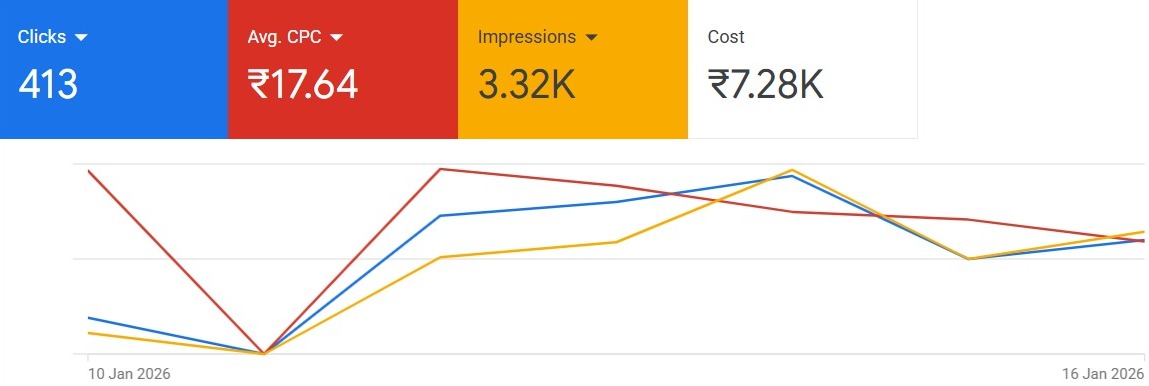
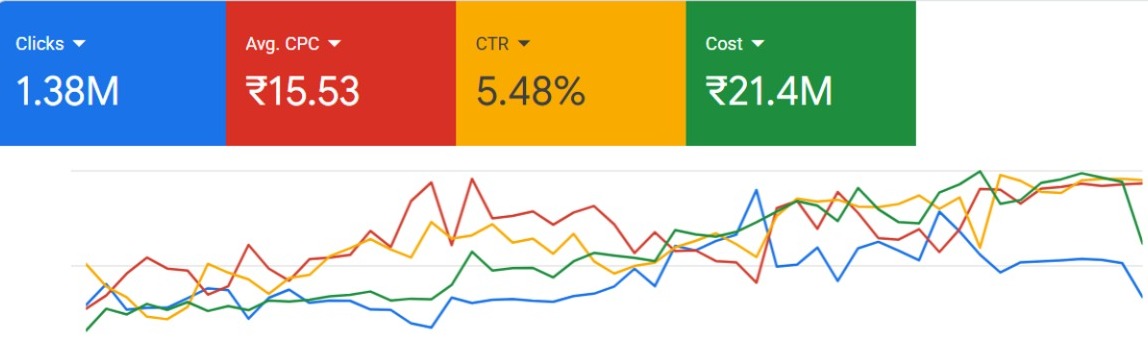
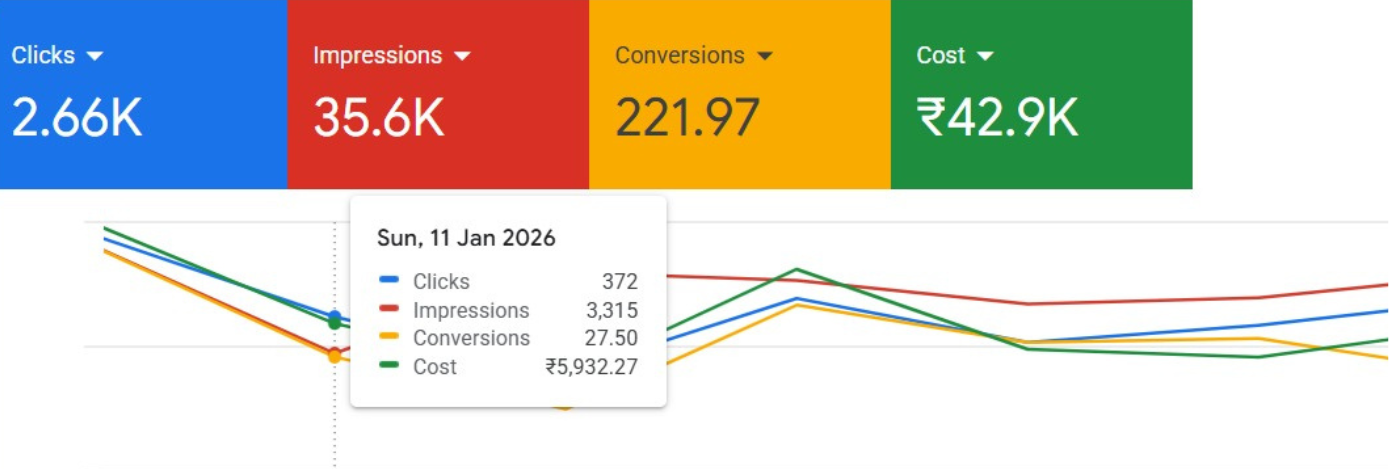
Lower Cost, Better ROI
By mastering bidding strategies, keyword selection, and campaign optimization, you’ll be able to:
Reduce cost per click
Improve campaign efficiency
Maximize return on investment
Scale campaigns profitably
After completing this training, you won’t just run ads — you’ll run them strategically and profitably.
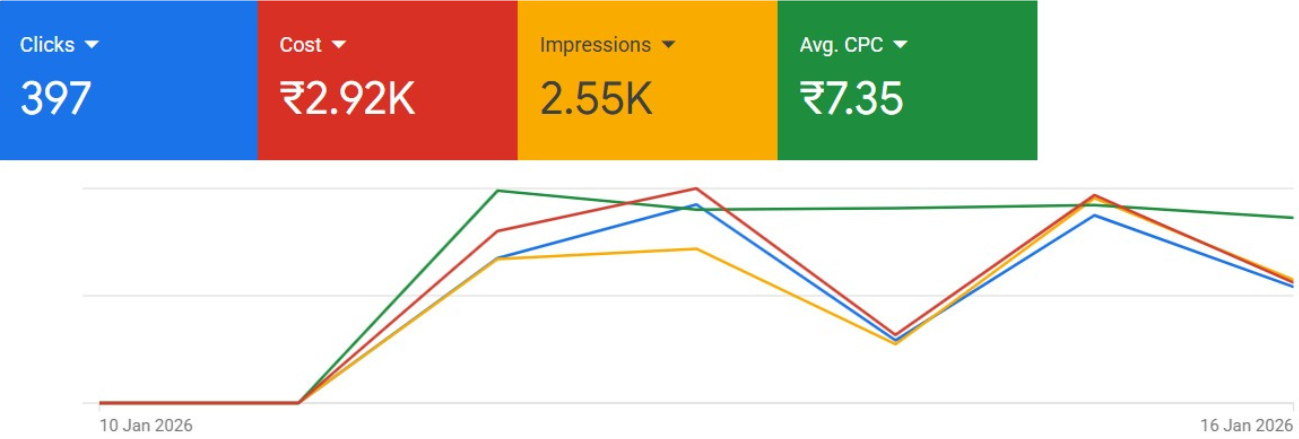
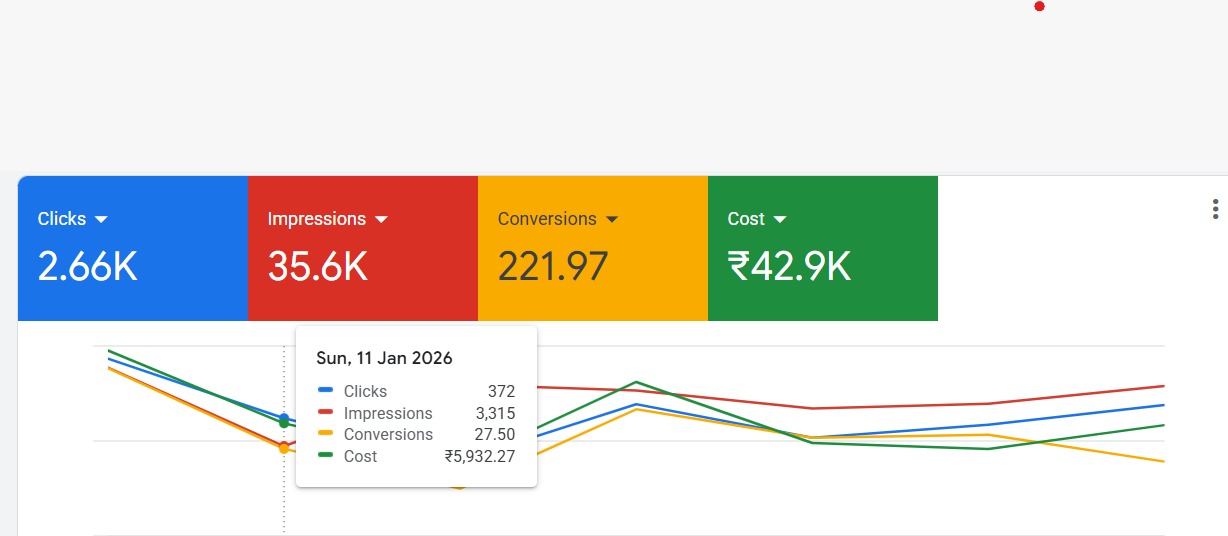
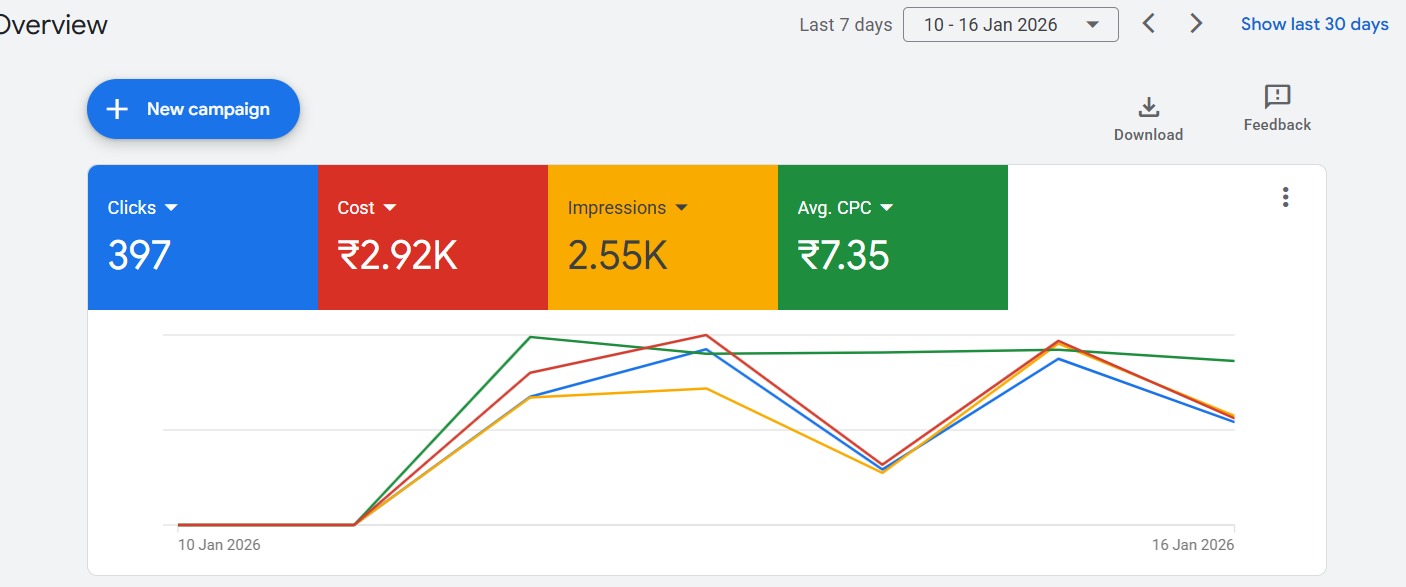
Our Proven Google Ads Process
01. Research & Strategy
We analyze your business, competitors, and audience to create a data-driven ad strategy that targets high-intent users and maximizes results.
02. Campaign Setup & Launch
Our experts build optimized campaigns, write compelling ads, select keywords, and configure targeting for strong performance from day one.
03. Tracking & Optimization
We implement conversion tracking, monitor metrics, test variations, and refine bids to reduce costs and improve campaign efficiency.
04. Reporting & Scaling
You receive clear performance reports and insights while we scale winning campaigns to increase leads, sales, and ROI consistently.
Smart Strategy. Measurable Results. Scalable Growth.
Why Choose Our Google Ads Training?
Practical & Live Training
Learn with real campaign examples and live demonstrations inside Google Ads — not just theoretical lessons. We focus on hands-on implementation so you gain real confidence.
Beginner to Advanced Curriculum
Our structured modules start from basics and move to advanced strategies like conversion tracking, bidding optimization, and scaling campaigns.
Mentor Support & Guidance
Get direct guidance, doubt-solving sessions, and strategic insights to help you avoid costly mistakes and learn faster.
Job & Freelancing Ready Skills
Our team continuously monitors your campaigns to ensure they perform at their best. We analyze data, test new strategies, refine targeting, and optimize bids to improve results and reduce wasted spend. Plus, you get dedicated expert support whenever you need guidance, updates, or strategic recommendations to scale your advertising performance consistently.
Frequently Asked Questions
1. Is this Google Ads training suitable for beginners?
Yes, this training is beginner-friendly. We start from the basics and gradually move to advanced campaign strategies, so even if you have no prior experience with Google Ads, you can easily follow along.
2. Will I get practical, hands-on experience?
Absolutely. This is a practical training program where you’ll learn live campaign setup, keyword research, ad creation, bidding strategies, and performance optimization — not just theory.
3. Can I use this skill for freelancing or my own business?
Yes. After completing the training, you’ll be able to run ads for your own business, offer services as a freelancer, or apply for digital marketing jobs with confidence.
Google ads training in hindi

Introduction to Google Ads
- Overview of Google Ads
- Account Setup
- Billing Methods
- Old Version vs. New version
- Google Ads Interface Tour
- Basic Google ads Terminology
- Recent updates in Google Ads
- Account structure in Google Ads
- Account Limits
Pay Per Click Campaign
- Types of Campaigns
- Defining the objective of the campaign
- Location Targeting
- Language Settings
- Google Partners
- Bidding Strategies
- Defining the Budget
- Ad Scheduling
- Ad delivery and Ad Rotation
AdGroups and Keywords Setup
- What is Ad Group?
- How to set up Ad Groups
- Keyword Research
- Keyword Match Types
- Broad Match
- Broad Match Modifier
- Phrase Match
- Exact Match
- Negative Match
- Keyword Planner Tool
- Creating a Plan with Estimations
- Adding Keywords to Ad Groups
Ad Formats and Guidelines
- Types of Ads
- Expanded Ad Format
- Responsive Ad Format
- Call Only Ad
- Structure of Ad
- Elements of Effective Ads
- Writing the Ad Copy
- Final URL of Ad
- URL Options
- Mobile URL Option
- Best and Worst Ads Examples
- Google Ads Guidelines
- Copyrights & Trademark Guidelines
Google Ads Auction and Bidding
- What is Ads Auction
- What is Ad Rank
- What is Quality Score
- How to improve Quality Score
- Improving Ad Relevance
- Improving Landing Page Experience
- Improving the CTR
- What is Actual CPC?
- How QS affects the Cost?
- Types of CPC’s
- Bidding Strategies
- Auction Insights Tool
Ad Extensions
- Sitelinks Extension
- Callout Extension
- Structured Snippet
- CallExtension
- Message Extension
- Location Extension
- Affiliate Location Extension
- Price & Promotion Extension
- App Extension
- Automated Extensions
Conversion Tracking
- What is Conversion
- Types of Conversions
- Website Conversion
Campaign Reports Analysis
- Key Performance Indicators (KPIs)
- Different Levels of Data Analysis
- Segmenting Data
- Filtering Data
- Column Customization
- Search Terms Report
- Auction Insights Report
- Keyword Reports
- Automated Rules
- Dimensions Report
Display Ads Campaign
- What is Display Ads
- Objectives of Display Campaign
- Bidding Strategies
- Budget Settings
- Audience Targeting Methods
- Demographic Targeting
- Content-based Targeting
- Automated Targeting
- Types of Ad Formats
- Creating Custom Ads
- Conversion Tracking
- Gmail Ads
- Creating a Gmail Ads Campaign
Remarketing Campaign
- What is Remarketing
- How to build audience list
- Types of Remarketing Audience
- Website audience
- App Audience
- Create a Remarketing Campaign
- Remarketing Ads
- Conversion Tracking
- Measuring Results of Campaign
Video Marketing with YouTube
- Why video marketing?
- Setting a Video Campaign
- The objective of Video marketing
- Instream Ads
- Discovery Ads
- YouTube Targeting options
- Bidding Types
- Type of YouTube Ads
- Creating a YouTube Ad
- Remarketing Lists on YouTube
Google Ads Tool
Get Google Ads Fee Details
Introduction to Google Ads
- Overview of Google Ads
- Account Setup
- Billing Methods
- Old Version vs. New version
- Google Ads Interface Tour
- Basic Google ads Terminology
- Recent updates in Google Ads
- Account structure in Google Ads
- Account Limits
Pay Per Click Campaign
- Types of Campaigns
- Defining the objective of the campaign
- Location Targeting
- Language Settings
- Google Partners
- Bidding Strategies
- Defining the Budget
- Ad Scheduling
- Ad delivery and Ad Rotation
AdGroups and Keywords Setup
- What is Ad Group?
- How to set up Ad Groups
- Keyword Research
- Keyword Match Types
- Broad Match
- Broad Match Modifier
- Phrase Match
- Exact Match
- Negative Match
- Keyword Planner Tool
- Creating a Plan with Estimations
- Adding Keywords to Ad Groups
Ad Formats and Guidelines
- Types of Ads
- Expanded Ad Format
- Responsive Ad Format
- Call Only Ad
- Structure of Ad
- Elements of Effective Ads
- Writing the Ad Copy
- Final URL of Ad
- URL Options
- Mobile URL Option
- Best and Worst Ads Examples
- Google Ads Guidelines
- Copyrights & Trademark Guidelines
Google Ads Auction and Bidding
- What is Ads Auction
- What is Ad Rank
- What is Quality Score
- How to improve Quality Score
- Improving Ad Relevance
- Improving Landing Page Experience
- Improving the CTR
- What is Actual CPC?
- How QS affects the Cost?
- Types of CPC’s
- Bidding Strategies
- Auction Insights Tool
Ad Extensions
- Sitelinks Extension
- Callout Extension
- Structured Snippet
- CallExtension
- Message Extension
- Location Extension
- Affiliate Location Extension
- Price & Promotion Extension
- App Extension
- Automated Extensions
Conversion Tracking
- What is Conversion
- Types of Conversions
- Website Conversion
Campaign Reports Analysis
- Key Performance Indicators (KPIs)
- Different Levels of Data Analysis
- Segmenting Data
- Filtering Data
- Column Customization
- Search Terms Report
- Auction Insights Report
- Keyword Reports
- Automated Rules
- Dimensions Report
Display Ads Campaign
- What is Display Ads
- Objectives of Display Campaign
- Bidding Strategies
- Budget Settings
- Audience Targeting Methods
- Demographic Targeting
- Content-based Targeting
- Automated Targeting
- Types of Ad Formats
- Creating Custom Ads
- Conversion Tracking
- Gmail Ads
- Creating a Gmail Ads Campaign
Remarketing Campaign
- What is Remarketing
- How to build audience list
- Types of Remarketing Audience
- Website audience
- App Audience
- Create a Remarketing Campaign
- Remarketing Ads
- Conversion Tracking
- Measuring Results of Campaign
Video Marketing with YouTube
- Why video marketing?
- Setting a Video Campaign
- The objective of Video marketing
- Instream Ads
- Discovery Ads
- YouTube Targeting options
- Bidding Types
- Type of YouTube Ads
- Creating a YouTube Ad
- Remarketing Lists on YouTube